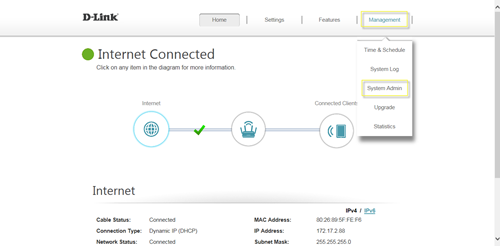
Please launch your browser and enter http://dlinkrouter.local or http://192.168.0.1 into the address bar. Then login and follow the steps below: Step 1: Click Management -> System Admin
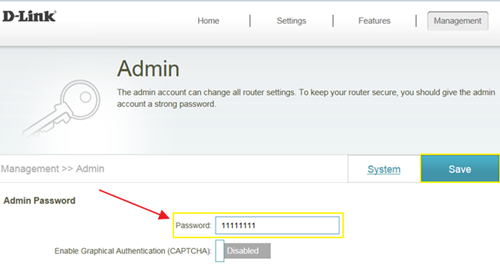
Step 2: Fill in the password you’d like to set and click Save:
Rank: 1.5
867 people found this useful.
Did you find this useful?
867 people found this useful.
Thank you for your feedback.
Sorry we couldn't help! Click here for more FAQs or go to Support.
These may also help:
How do I backup/restore the configuration on my router?Read Answer
How do I change the router’s IP address?Read Answer
How do I configure the wireless mode (802.11) on my router?Read Answer