Products
ProductsSolutionsApplications
Resources
Introduction
Various SMS controls can be applied to monitoring systems and can be quickly enabled after simple configuration, which is suitable for remote device management, saving time and effort. In this example, we will show the SMS configuration rules of M2M devices and how to set trigger events to take action on the device when trigger events come from SMS.
Prerequisites
1. An M2M device with 4G or 5G functionality
2. At least one device:
- A PC, laptop, or tablet is required to configure the M2M device.
- This feature is applicable to the following models:
DWM-311, DWM-311-G, DWM-311-TP, DWM-311-GP, DWM-313, DWM-530-T, DWM-550-G, DOM-311-TSO, DOM-530-TSO, DOM-550-GSO, DTM-550-G
Topology
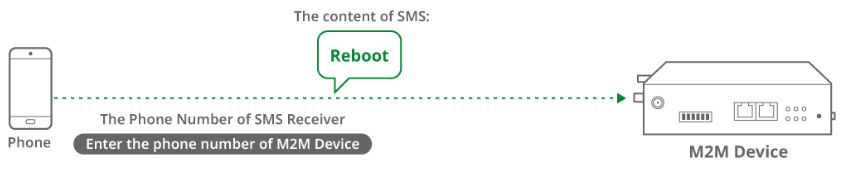
Let us take the DOM-530-TSO and a mobile phone as an example. When the user sends an SMS message to the DOM-530-TSO with a reboot message, the DOM-530-TSO reboots.
Note: Before starting this configuration, please make sure the basic network settings of the D-Link M2M device are configured properly.
Configuration
1. SMS Configuration
Go to Service > SMS & Event > Managing Events tab
You can click the Enable and Add buttons to configure the profile.
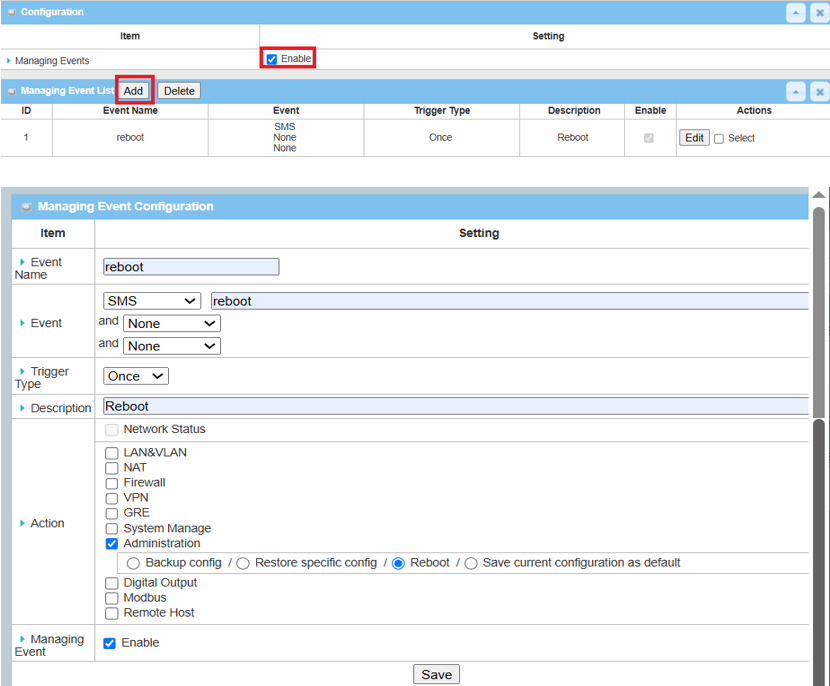
| Item | Description |
|---|---|
| Event Name | Enter a name for the event |
| Event | Select the SMS event trigger |
| Trigger Type | Select Once |
| Description | Enter a description for the event notification message |
|
Action |
Select the Administration and Reboot function |
| Managing Events | Enable |
| Save | Click the Save button to save settings |
Note: This example shows the "Reboot" function. Please select another Action item (e.g., LAN On/Off, VPN On/Off, etc.) as the same procedure.
Test Result
Please configure the device according to the above environment, then validate to ensure everything works as expected.
1. Expected Test Results:
The user sends an SMS to DOM-530-TSO, and DOM-530-TSO recognizes the content of the SMS and then executes the reboot function.
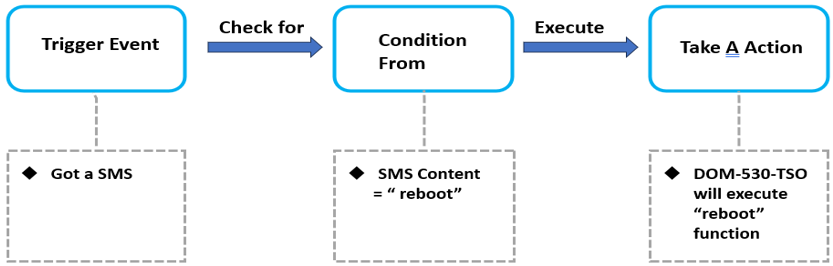
Fig. 2 Flow Chart and Expected Test Results
2. Test Results:
We take the DOM-530-TSO as an example to conduct the following test.
When the DOM-530-TSO receives an SMS event with the content "reboot," it executes the reboot action. After the reboot is performed, you will see all LEDs on the device turn off and then back on.
Note: In this example, please ensure that the network connection is available.