Products
ProductsSolutionsApplications
Resources
The following steps will help you synchronize the DHP-W311AV.
Step 1 – Connect both products to the same power socket/power strip.
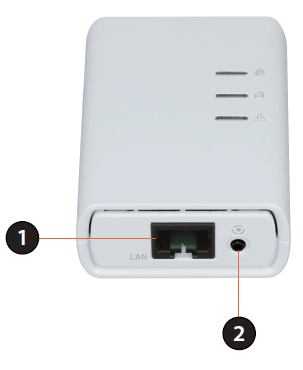
Step 2 – On the non-wireless device (the smaller device with the 3 lights) press the button (marked as 2 in the image below) for 10 seconds. The button is next to the network socket (marked as 1 in the image below).
Step 3 – On the wireless device (the larger device with 4 lights) press the reset switch (marked as 1 in the image below) with a paperclip for 10 seconds.
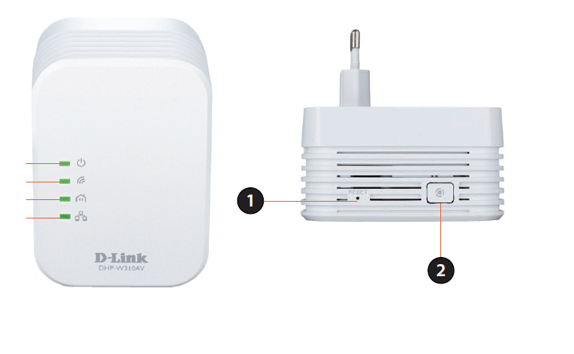
Step 4 – Check that the light with the icon like a house is lit in green on both devic-es. This indicates that both units are communicating.
Step 5 – You can now scan for Wireless networks on your computer.
Step 6 – Locate the network name that starts with "dlink".
Step 7 – Connect to this network and enter the password as it appears on the card included with the device.
Step 8 – Check that you are able to connect to the internet.
Step 9 – You can now locate the wireless device wherever you want to use it. When the light turns green the device has finished booting up.
Step 10 – Check that the light with the house icon is green. If not, then either try a different power outlet, or try moving the device closer to the router.
345 Други потребители намират това за полезно.
Беше ли това полезно за Вас?345 Други потребители намират това за полезно.
Благодарим Ви за обратната връзка.
Съжаляваме, че не успяхме да помогнем! Натиснете тук за повече Въпроси и отговори или за да отидете в секция Поддръжка.