Products
ProductsSolutionsApplications
Resources
Introduction
SNMP (Simple Network Management Protocol) is a protocol that supports network management systems to monitor information about devices connected to the network by polling and setting device parameters. In this example, we will show the SNMP configuration rules of M2M devices and enable SNMP for a server-side application.
Prerequisites
1. An M2M device with 4G or 5G function.
2. At least one device:
- A PC, laptop, or tablet is required to configure the M2M device.
- This feature is applicable to the following models:
DWM-313, DWM-530-T, DWM-550-G, DOM-530-TSO, DOM-550-GSO, DTM-550-G
Topology

The iReasoning MIB Browser tool is used as an NMS (Network Management System). In addition, we take the DOM-550-GSO as an example and adopt an Ethernet local network. The NMS (Network Management System) tool can manage M2M devices through the SNMP protocol.
Table 1 is a typical list of key M2M device information. OIDs can be used to manage M2M devices.
The NMS (Network Management System) is selected by you. D-Link cannot guarantee compatible functionality.
| Function Description | OID | For Example |
|---|---|---|
| sysContact | .1.3.6.1.2.1.1.4.0 | DOM-550-GSO |
| sysLocation | .1.3.6.1.2.1.1.6.0 | Taipei |
| Device Name | .1.3.6.1.4.1.171.70.4.9.6.4.2.1.1.0 | DOM-550-GSO |
| SN | .1.3.6.1.4.1.171.70.4.9.6.4.2.1.2.0 | T31L129000009 |
| Kernel Version | .1.3.6.1.4.1.171.70.4.9.6.4.2.1.3.0 | 4.4.124 |
| FW Version | .1.3.6.1.4.1.171.70.4.9.6.4.2.1.4.0 | 1.00.02_20250402 |
| System Time | .1.3.6.1.4.1.171.70.4.9.6.4.2.1.7.0 | Fri, 09 May 2025 06:27:19 +0000 |
| Device Uptime | .1.3.6.1.4.1.171.70.4.9.6.4.2.1.8.0 | 0day 19hr 10min 28sec |
| CPU load (%) | .1.3.6.1.4.1.171.70.4.9.1.1.1.1.2.0 | 22 (%) |
| Memory load (%) | .1.3.6.1.4.1.171.70.4.9.1.1.1.1.3.0 | 36 (%) |
| Connection Sessions | .1.3.6.1.4.1.171.70.4.9.1.1.1.1.4.0 | 0 |
| IP Address of 4G or 5G | .1.3.6.1.4.1.171.70.4.9.1.4.1.1.4.0 | 10.55.30.205 |
| IP Address of Device | .1.3.6.1.4.1.171.70.4.9.2.4.1.1.1.0 | 192.168.0.1 |
| IP Address of Ethernet WAN | .1.3.6.1.4.1.171.70.4.9.1.4.1.1.15.0 | 192.168.200.217 |
| MAC Address of Ethernet WAN | .1.3.6.1.4.1.171.70.4.9.1.4.1.1.20.0 | 48:EE:0C:AD:E2:8C |
| 4G/5G band | .1.3.6.1.4.1.171.70.4.9.1.4.1.4.1.1.25.1 | N78+B7+B28 |
| Operator | .1.3.6.1.4.1.171.70.4.9.1.4.1.4.1.1.21.1 | FET |
| Work for SIM-A or B | .1.3.6.1.4.1.171.70.4.9.1.4.1.4.1.1.14.1 | SIM-B |
| Signal Strength (%) | .1.3.6.1.4.1.171.70.4.9.1.4.1.4.1.1.5.1 | 100 (%) |
| 4G/5G RSRP | .1.3.6.1.4.1.171.70.4.9.1.4.1.4.1.1.34.1 | -80, -80, -64 |
| 4G/5G RSRQ | .1.3.6.1.4.1.171.70.4.9.1.4.1.4.1.1.35.1 | -13 |
| Wi-Fi 2.4G SSID | .1.3.6.1.4.1.171.70.4.9.2.7.1.2.1.1.2.1 | DOM-550-Demo |
| Wi-Fi 5G SSID | .1.3.6.1.4.1.171.70.4.9.2.7.2.2.1.1.2.1 | DOM-550-5G-Demo |
| Wi-Fi 2.4G Channel | .1.3.6.1.4.1.171.70.4.9.2.7.1.1.3.0 | auto |
| Wi-Fi 5G Channel | .1.3.6.1.4.1.171.70.4.9.2.7.2.1.3.0 | auto |
Table 1: Basic Key Device Information List
Configuration
1. SNMP Configuration:
Go to Administration > Configuration & Manage > SNMP tab
You can click the Enable and Add buttons to configure the profile.
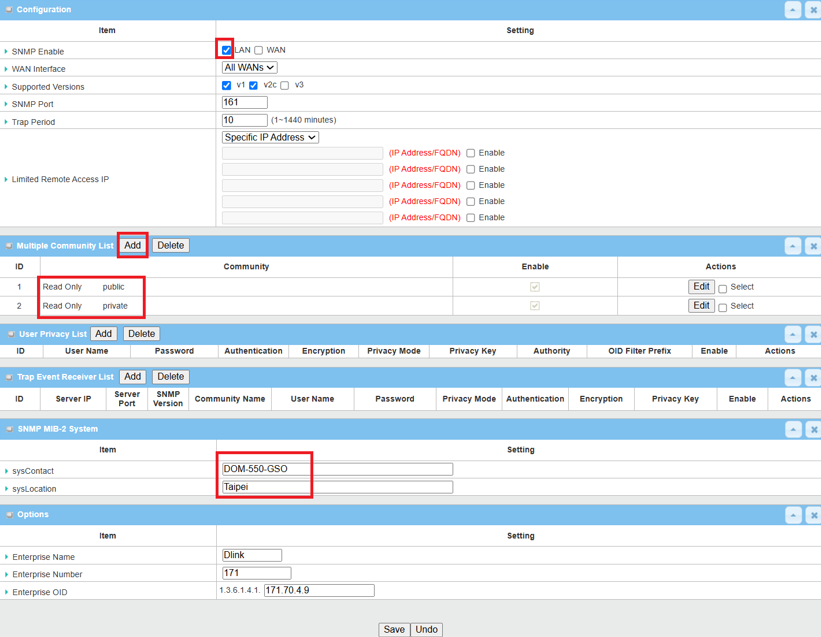
| Item | Description |
|---|---|
| SNMP Enable | Select LAN for local network |
| WAN Interface | Specify the WAN interface that a remote SNMP host can access through the device. By default, All WANs interfaces are selected. |
| Supported Versions | Select the SNMP version: v1, v2c |
| SNMP Port |
Specify the SNMP Port: 161 Value Range: 1 - 65535 |
| Trap Period | Specify the frequency of trap generation. (1~1440 minutes) |
|
Limited Remote Access IP |
Specify the Remote Access IP and enter a single IP address or a range of IP addresses to permit management to use SNMP through the WAN. |
| Item | Description |
|---|---|
| Community |
Specify the privilege for the community: 1. Select Read Only (GET and GETNEXT requests) and enter public for SNMP community name 2. Select Read/Write (GET, GETNEXT, and SET requests) and enter private for SNMP community name |
| Enable | Enable |
| Item | Description |
|---|---|
| sysContact | Specify the contact information for MIB-II system |
| sysLocation | Specify the location information for MIB-II system |
Test Result
Please configure the device according to the above environment, then validate to ensure everything works as expected.
1. Expected Test Results:
The NMS (Network Management System) collects all device information from the DOM-550-GSO device via SNMP OID. The server can manage the DOM-550-GSO device via the SNMP protocol.
2. Test Results:
We use the DOM-550-GSO and iReasoning MIB Browser to conduct the following tests. And, according to DOM-550-GSO, we set the IP, port, read/write community and SNMP version according to the settings of the DOM-550-GSO on the iReasoning MIB Browser tool.
The NMS (Network Management System) collects device information from the DOM-550-GSO via the SNMP protocol. The following is the test result of collecting device information on the iReasoning MIB Browser tool using the OIDs in Table 1.

Note: In this example, we use an Ethernet local network and an NMS (Network Management System) to collect data.