Products
ProductsSolutionsApplications
Resources
Introduction
This feature is applicable to remote devices when someone else wants to log in to the device, so that users can get real-time responses, saving time and effort. In this example, we will demonstrate SMS configuration rules for M2M devices and how to set trigger events from M2M devices and send SMS messages to users instantly.
Prerequisites
1. An M2M device with 4G or 5G functionality
2. At least one device:
- A PC, laptop, or tablet is required to configure the M2M device.
- This feature is applicable to the following models:
DWM-313, DWM-530-T, DWM-550-G, DOM-311-TSO, DOM-530-TSO, DOM-550-GSO, DTM-550-G
3. At least one mobile phone.
Topology

Let us take the DOM-530-TSO and a mobile phone as an example. When someone tries to log in to the device web GUI with an incorrect ID or password, the DOM-530-TSO will send an SMS message to the user.
Note: Before starting SMS configuration, please make sure the basic network settings of the D-Link M2M device are configured properly.
Configuration
1. SMS Account Configuration:
Go to Service > SMS & Event > Configuration tab
You can click the Enable and Add buttons to configure the profile.
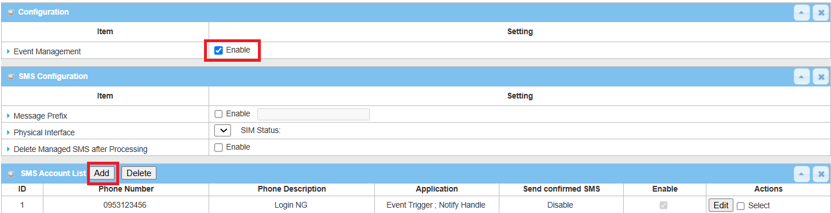
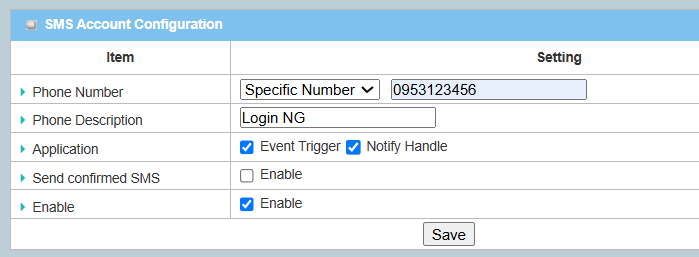
| Item | Description |
|---|---|
| Phone Number | Enter the mobile phone number you want to send |
| Description | Enter a description for the event notification message |
| Application | Trigger from Event Trigger and Notify Handle |
| Enable | Enable |
2. Nofifying Event Configuration:
Go to Service > SMS & Event > Notifying Events tab
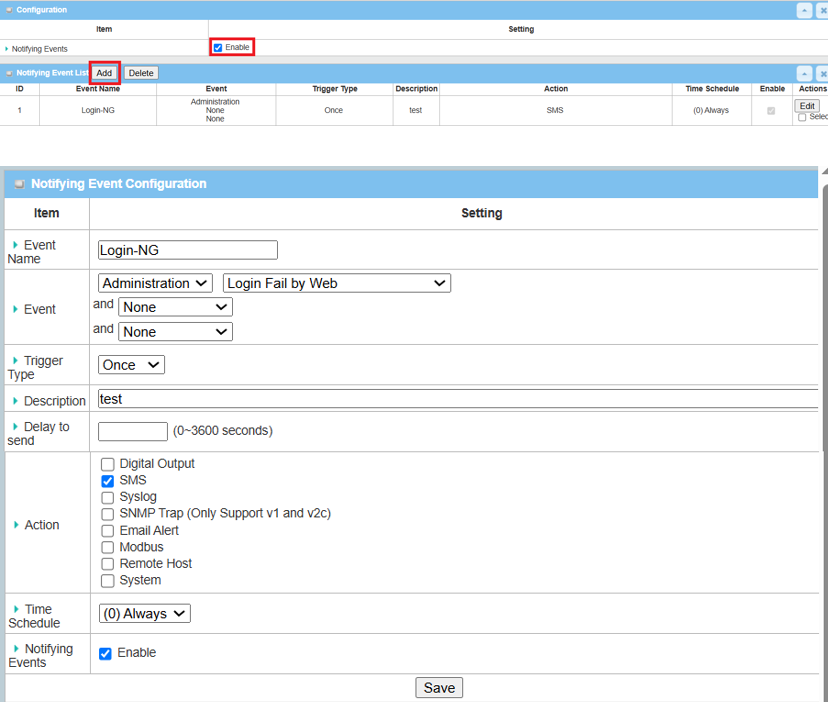
| Item | Description |
|---|---|
| Event Name | Enter a name for the event. |
| Event | Select the Administration and Login Fail by Web event trigger |
| Trigger Type | Select Once |
| Description | Enter a description for the event notification message |
| Action | Select SMS. Send an SMS to the user |
Test Result
Please configure the device according to the above environment, then validate to ensure everything works as expected.
1. Expected Test Results:
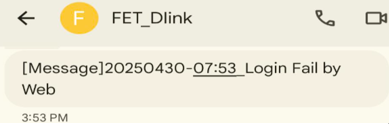
When someone tries to log in to the device web GUI with an incorrect ID or password, the DOM-530-TSO will send an SMS message to the user. 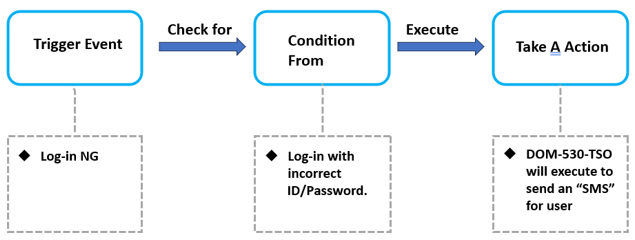
2. Test Results:
We take DOM-530-TSO as an example to conduct the following test.
Someone tries an incorrect ID or password on the device web GUI and the DOM-530-TSO sends an SMS message. The user's mobile phone also receives a text message as shown below.
Note: In this example, please ensure that the network connection is available.