How do I reset my router to factory default settings?
Example: If you forget your router’s password, you can do the factory reset.
Step 1: With the router on, insert the end of a paper clip into the pinhole highlighted below.
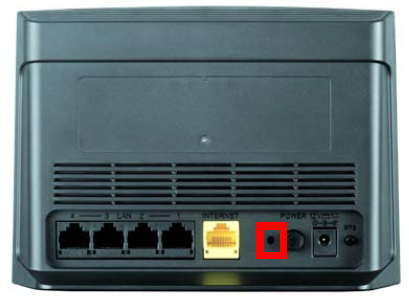
Step 2: Hold the paper clip down for 10 seconds and release.
Step 3: The unit will reboot automatically. Once the WLAN light stops blinking, the unit has been reset. Resetting the router does not reset the firmware to an earlier version. It changes all settings back to factory defaults.
Note:
- The factory default username is Admin, and there is no password.
- You will need to register with mydlink again after a factory reset.
1018 Други потребители намират това за полезно.
Беше ли това полезно за Вас?1018 Други потребители намират това за полезно.
Благодарим Ви за обратната връзка.
Съжаляваме, че не успяхме да помогнем! Натиснете тук за повече Въпроси и отговори или за да отидете в секция Поддръжка.
Това също може да Ви помогне:
- How do I back up the router configuration to my computer? Прочети отговорите
- How do I upgrade the firmware on my router? Прочети отговорите