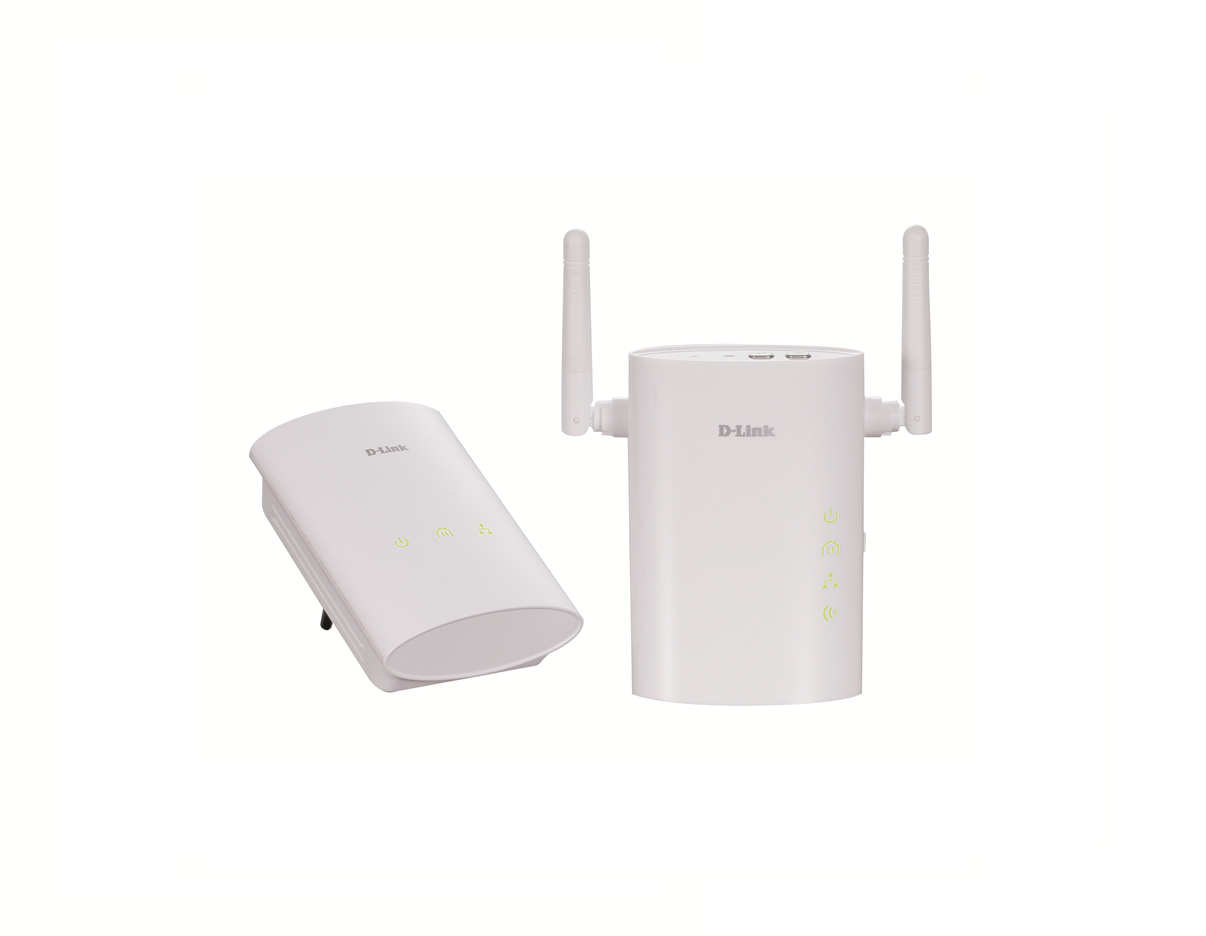
Kit de démarrage CPL Homeplug AV Wireless N
DHP-W307AV
- Statut produit (Revision A): End of Life
- Adaptateur transformant n’importe quelle prise électrique en point de connexion câblé ou sans fil
- Nouvelle norme Wireless N, débit sans fil allant jusqu’à 300 Mbps et rétrocompatibilité avec la norme Wireless G
- Débit de transfert de données via les câbles électriques existants : 200 Mbps
- Moteur de qualité de service (QoS) assurant la hiérarchisation des applications sensibles aux retards (diffusion multimédia en continu, appels téléphoniques via Internet, audio/vidéo)
- Meilleure résistance aux interférences électriques
- Configuration facile grâce au bouton de commande et chiffrement de données évolué
- D-Link Green™ : conception privilégiant les économies d’énergie
Le kit de démarrage Homeplug AV Wireless N DHP-W307AV de D-Link convertit n’importe quelle prise de courant en point de connexion réseau câblé ou sans fil. Il vous permet ainsi d’étendre votre réseau sans fil existant à l’aide du câblage électrique de votre domicile.
Configuration pratique et fonctionnement sécurisé
Les deux adaptateurs du kit DHP-W307AV se branchent directement sur une prise murale1, sans nécessiter de câbles supplémentaires. Ils vous permettent d’étendre votre réseau domestique en connectant plusieurs appareils dans les zones les plus éloignées de votre domicile via un câble Ethernet ou une connexion Wireless N. Pour plus de facilité, vous pouvez configurer des clés de chiffrement câblées ou sans fil par simple appui sur un bouton de l’appareil et protéger votre réseau de tout branchement clandestin. Avec son installation Plug-and-Play simplissime, le DHP-W307AV est une solution idéale pour créer un réseau domestique intérieur inattaquable.
Idéal pour les applications gourmandes en bande passante
Le kit de démarrage DHP-W307AV peut atteindre des débits de transfert de données allant jusqu’à 200 Mbps sur un réseau câblé. Grâce à une technologie de pointe qui lui permet de mieux résister aux interférences électriques provoquées par les autres appareils ménagers, les utilisateurs bénéficient des vitesses de transmission maximales. Cette solution est donc idéale pour les applications gourmandes en bande passante, car elle garantit une diffusion vidéo haute définition fluide et des appels VoIP de qualité, tout en supprimant les décalages pour les jeux en ligne. De plus, son moteur de qualité de service hiérarchise le trafic Internet pour empêcher toute perturbation des applications multimédia lors de la navigation sur le Web ou du téléchargement de données. Le kit fournit une large bande passante réseau, ce qui permet aux particuliers adeptes du numérique de visionner du contenu multimédia en continu de grande qualité via le câblage électrique existant.
Compatibilité
Reposant sur la technologie de pointe PowerLine Alliance, les adaptateurs du kit DHP-W307AV sont compatibles avec les appareils d’autres marques conçus selon la même norme Homeplug AV, notamment les modèles DHP-306AV/-307AV et DHP-P306AV/-P307AV de D-Link. La norme Wireless N est également rétrocompatible avec les appareils Wireless G. Dans une optique de protection des investissements, ces adaptateurs CPL sont compatibles IPv6 pour garantir la prise en charge des réseaux à venir.
D-Link Green™
Le kit de démarrage CPL Homeplug AV Wireless N s’inscrit dans le programme D-Link Green, l’initiative D-Link qui propose des alternatives respectueuses de l’environnement sans pour autant renoncer aux performances. En l’absence de transmission de données pendant une durée prédéfinie, les adaptateurs passent automatiquement en mode veille pour économiser l’énergie. La fonction WLAN Scheduler, une exclusivité D-Link, permet de désactiver la connexion sans fil lorsque l’on ne l’utilise pas (la nuit ou pendant les heures de travail, par exemple).
1 Les prises et les câbles électriques doivent tous faire partie du même circuit.
Photo non contractuelle
Produits apparentés
|
Vitesse sans fil
|
AV 200 |
|---|---|
|
Interface filaire
|
1 x Fast Ethernet LAN |
|
Modes sans fil
|
Wireless extender |
| Version | Date | Type | Taille de fichier | |
|---|---|---|---|---|
| Fiche en anglais | - | - | - | Télécharger |
| Version | Description | Date | Type | Taille de fichier | |
|---|---|---|---|---|---|
| Manuel en français | Manuel en français | - | - | - | Télécharger |
| Manuel en anglais | Manuel en anglais | - | - | - | Télécharger |
| Manuel en allemand | Manuel en allemand | - | - | - | Télécharger |
| Version | Description | Date | Type | Taille de fichier | |
|---|---|---|---|---|---|
| Guide d'Installation | Guide d'Installation | - | - | - | Télécharger |
http://tsd.dlink.com.tw/GPL.asp
Le code GPL et le code LGPL utilisés dans ce produit sont distribués SANS AUCUNE GARANTIE et sont sujet aux droits d'un ou plusieurs auteurs. Pour plus de détails, consulter le code GPL et le code LGPL de ce produit ainsi que les termes du GPL et du LGPL.
| Version | Description | Date | Type | |
|---|---|---|---|---|
| 1.03b01 | Firmware actuel | 11-02-14 | - | Télécharger |
| Version | Description | Date | |
|---|---|---|---|
| D-Link PLC Utility pour Windows | D-Link PLC Utility pour Windows | 18-12-19 | Télécharger |
| GPL Firmware Sourcecode | GPL Firmware Sourcecode | - | Télécharger |
| Version | Description | Date | |
|---|---|---|---|
| Déclaration de Conformité Rev.A1 | Déclaration de Conformité Rev.A1 | - | Télécharger |
| Déclaration de Conformité Rev.A2 | Déclaration de Conformité Rev.A2 | - | Télécharger |